

Setting Up Your Stage Monitor Speakers for Optimal Sound: A Comprehensive Guide
Setting Up Your Stage Monitor Speakers for Optimal Sound Table of Contents Introduction to Stage Monitor Speakers The Importance of Stage Monitor Speakers in Live Performances Understanding Different Types of Stage Monitors Positioning Your Stage Monitor Speakers for Maximum Effectiveness Angle and Height Considerations Distance from Performer
Apr 02,2026
Setting Up Your Stage Monitor Speakers for Optimal Sound
Table of Contents
- Introduction to Stage Monitor Speakers
- The Importance of Stage Monitor Speakers in Live Performances
- Understanding Different Types of Stage Monitors
- Positioning Your Stage Monitor Speakers for Maximum Effectiveness
- Essential EQ Settings for Stage Monitors
- Cable Management and Connectivity Tips
- Common Sound Issues and Troubleshooting Tips
- Maintaining Your Stage Monitor Speakers
- Conclusion: Achieving the Perfect Sound
- Frequently Asked Questions
Introduction to Stage Monitor Speakers
Stage monitor speakers are essential tools in live performance settings, providing performers with the ability to hear themselves and the mix of instruments clearly. Unlike standard speakers that project sound into the audience, stage monitors deliver sound directly to musicians on stage, allowing for precise control over their performance. Properly setting up these monitors is crucial for achieving an optimal sound experience, both for the performers and the audience.
The Importance of Stage Monitor Speakers in Live Performances
In any live performance, whether it’s a concert, theater show, or corporate event, the role of stage monitor speakers cannot be overstated. They serve multiple purposes:
- Feedback Prevention: By allowing performers to hear themselves, stage monitors help to minimize the chances of feedback loops that can disrupt a performance.
- Performance Confidence: Musicians who can hear their instruments and vocals clearly are more likely to deliver a confident and polished performance.
- Adjustable Mixes: Stage monitors can be adjusted to provide different sound mixes for each performer, catering to their specific needs.
Understanding Different Types of Stage Monitors
Before setting up stage monitor speakers, it’s essential to understand the various types available. Each type has its unique characteristics and ideal use cases:
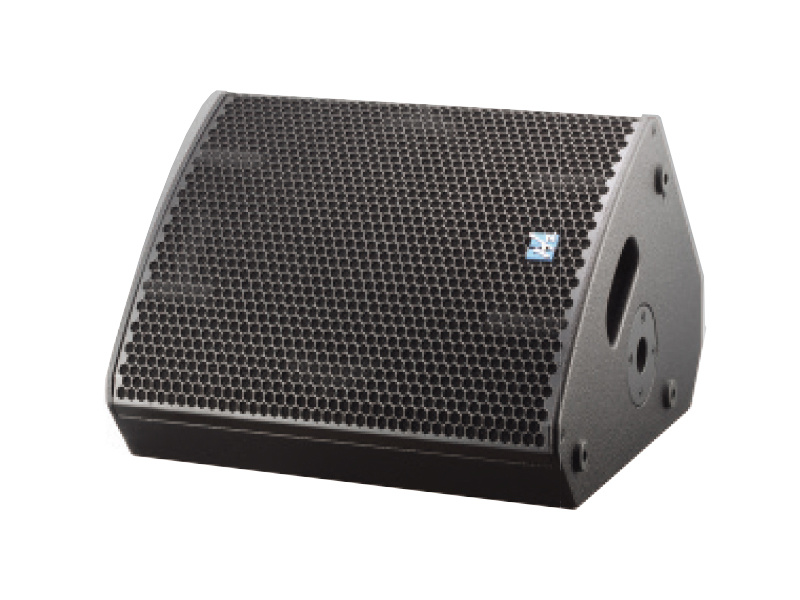
- Wedge Monitors: These traditional monitors are often used in live music setups. They are designed to be placed on the floor and are angled towards the performer.
- In-Ear Monitors (IEMs): These devices provide performers with a personalized audio mix through earphones, reducing stage volume and improving sound quality.
- Side Fill Monitors: These are larger speakers positioned at the sides of the stage, designed to provide additional sound coverage for larger performances.
Positioning Your Stage Monitor Speakers for Maximum Effectiveness
The placement of stage monitor speakers is vital for achieving optimal sound quality. Here are key factors to consider:
Angle and Height Considerations
Proper angling and height of your stage monitors can significantly influence sound clarity:
- Angle: Position monitors at a 30-degree angle towards the performer’s ears. This angle helps in maximizing direct sound while minimizing reflections from the stage floor.
- Height: The height should be adjusted so that the speaker’s horn is at ear level when the performer is standing. This ensures that the sound is directed effectively towards them.
Distance from Performer
The distance between the monitor speakers and the performers can affect sound quality and stage volume. Ideally, monitors should be placed as close as possible without obstructing the performers' movements. This proximity helps to ensure that the sound is clear and reduces the chance of feedback.
Essential EQ Settings for Stage Monitors
Tuning the EQ settings of your stage monitor speakers is essential for achieving a balanced sound profile. Here are recommended starting points:
- High Frequencies: Boost the high frequencies (3-5 kHz) slightly to enhance clarity without causing harshness.
- Mid Frequencies: Adjust the mid frequencies (250-800 Hz) to prevent muddiness, especially when multiple instruments are on stage.
- Low Frequencies: Be cautious with low frequencies (below 100 Hz); excessive bass can muddy the mix. Cut these frequencies as necessary.
Cable Management and Connectivity Tips
Effective cable management is crucial for both sound quality and safety. Here are tips on managing your cables:
- Use Quality Cables: Invest in high-quality cables to minimize signal loss and interference.
- Organize Cables: Use cable ties and clips to keep cables organized and prevent tripping hazards.
- Check Connections: Regularly inspect all connections to ensure they are secure and functioning properly.
Common Sound Issues and Troubleshooting Tips
Even with careful setup, sound issues can arise. Here are common problems and solutions:
- Feedback: If you experience feedback, try repositioning the microphones or adjusting the EQ settings.
- Imbalanced Sound: Ensure that the mixes sent to each monitor are balanced according to each performer’s needs.
- No Sound: Check all connections and ensure that the monitors are powered on and properly connected to the sound system.
Maintaining Your Stage Monitor Speakers
Regular maintenance of your stage monitor speakers is essential for longevity and performance:
- Clean Regularly: Keep speaker surfaces clean and dust-free to prevent clogging ports and affecting sound quality.
- Inspect Components: Regularly check speaker cones and wiring for any signs of wear or damage.
- Store Properly: When not in use, store monitors in a protective case to prevent physical damage.
Conclusion: Achieving the Perfect Sound
Setting up your stage monitor speakers for optimal sound involves careful planning and execution. By understanding the importance of monitors, choosing the right types, positioning them correctly, and fine-tuning the settings, you can significantly enhance the quality of live performances. Remember, the goal is to create an environment where performers can hear themselves clearly, boosting their confidence and performance quality. Regular maintenance and troubleshooting are also crucial to ensure that your equipment performs at its best every time. With these tips, you will be well on your way to achieving the perfect sound on stage.
Frequently Asked Questions
- What are the best angles for stage monitor speakers?
Ideally, stage monitors should be angled at about 30 degrees toward the performer’s ears to maximize clarity. - How far should stage monitors be from the performers?
Monitors should be placed as close as possible while allowing for performers to move freely, ideally within a few feet. - Why is EQ important for stage monitors?
EQ settings help enhance sound quality by balancing frequencies, preventing muddiness, and reducing feedback. - What should I do if I experience feedback?
Try repositioning microphones, adjusting EQ settings, or moving the monitor speakers to eliminate feedback. - How can I maintain my stage monitor speakers?
Regularly clean them, inspect for damage, and store them properly when not in use to ensure longevity.

CONTACT
Hzaudio Office Address: 16 st joins ave, mont Albert, Vic 3127, Australia
Hzaudio Lab Address: No. 455, Fuyi Road, Dalong Street, Panyu District, Guangzhou, China
Tel: +86 20-34882578 Cell:+86 18620144731
E-mail: sale@hzaudio.com
Follow Us On Wechat!