

Best Practices for Positioning Stage Monitor Speakers: Optimize Your Sound Experience
Best Practices for Positioning Stage Monitor Speakers Introduction to Stage Monitor Speakers Stage monitor speakers play a crucial role in live performances, providing musicians and performers with the audio feedback they need to deliver their best. Proper positioning of these speakers can significantly impact sound quality, ensuring that every note resonates clearly on stage. Understanding how to
Feb 02,2026
Best Practices for Positioning Stage Monitor Speakers
Introduction to Stage Monitor Speakers
Stage monitor speakers play a crucial role in live performances, providing musicians and performers with the audio feedback they need to deliver their best. Proper positioning of these speakers can significantly impact sound quality, ensuring that every note resonates clearly on stage. Understanding how to set up and optimize stage monitor speakers is essential for sound engineers and performers alike.
The Importance of Proper Speaker Placement
When it comes to stage monitor speakers, placement is not just a matter of convenience; it directly affects audio quality. Poor positioning can lead to phase issues, uneven sound distribution, and feedback problems, hindering a performer’s ability to hear themselves and their fellow musicians. By implementing best practices for positioning, sound engineers can create an optimal listening environment that enhances the overall performance.
Factors Affecting Speaker Positioning
Several factors influence how stage monitor speakers should be positioned, including:
1. **Stage Layout**: The size and shape of the stage will dictate where monitors can be most effectively placed.
2. **Audience Dynamics**: Understanding the audience's distance from the stage and how it interacts with sound can dictate monitor placement.
3. **Type of Performance**: Whether it’s a solo act, band, or theater production, the requirements will differ.
4. **Room Acoustics**: The acoustics of the venue can significantly affect sound quality, necessitating specific placement strategies.
Best Practices for Stage Monitor Speaker Positioning
1. Positioning at Ear Level
One of the most critical aspects of positioning stage monitor speakers is ensuring they are at ear level when performers are in their playing position. This positioning allows for the best sound projection directly to the ears of the performers, minimizing the need for excessive volume and reducing feedback risk.
2. Angle of Deployment
Monitors should be angled correctly towards the performers. A typical angle is between 30 and 45 degrees, which directs the sound towards the performer while minimizing sound spill into the audience. Adjusting the angle can help in situations where the stage has a sloped surface or uneven flooring.
3. Avoiding Feedback Loops
Feedback is one of the most common issues in live sound environments. To help avoid feedback:
- **Position monitors away from microphones**: Ensure that speakers do not point directly at any microphones that are in use.
- **Utilize directional microphones**: These can help to minimize the pickup of sound from the monitors, reducing the potential for feedback.
4. Space Considerations
Monitor speakers should be spaced adequately apart to ensure that each performer receives clear audio without interference. If multiple monitors are in use, consider the distance between them based on the stage's width and the performers' positions.
5. Adjusting Volume Levels
Proper volume levels for stage monitors are vital. Each performer may have different volume preferences, and adjusting these levels based on individual needs can help create a more comfortable performance environment. Regular sound checks will help in achieving this balance.
Advanced Techniques for Expert Sound Engineers
Utilizing the Right Equipment
Having the right equipment is vital for effective monitor placement. Professional-grade monitors that offer real-time sound feedback can significantly enhance performance quality. Pay attention to specifications, including power handling, frequency response, and dispersion angles.
Incorporating Wireless Systems
Wireless monitor systems offer unparalleled flexibility, allowing performers to move freely without being tethered to a specific location. These systems can be adjusted in real-time, accommodating performers’ needs as they move about the stage.
Remote Control Solutions
Using digital mixing consoles equipped with remote control capabilities allows sound engineers to make adjustments on the fly. This technology can be handy in live settings where quick changes are necessary to accommodate unforeseen challenges.
Understanding Different Types of Stage Monitor Speakers
1. Wedge Monitors
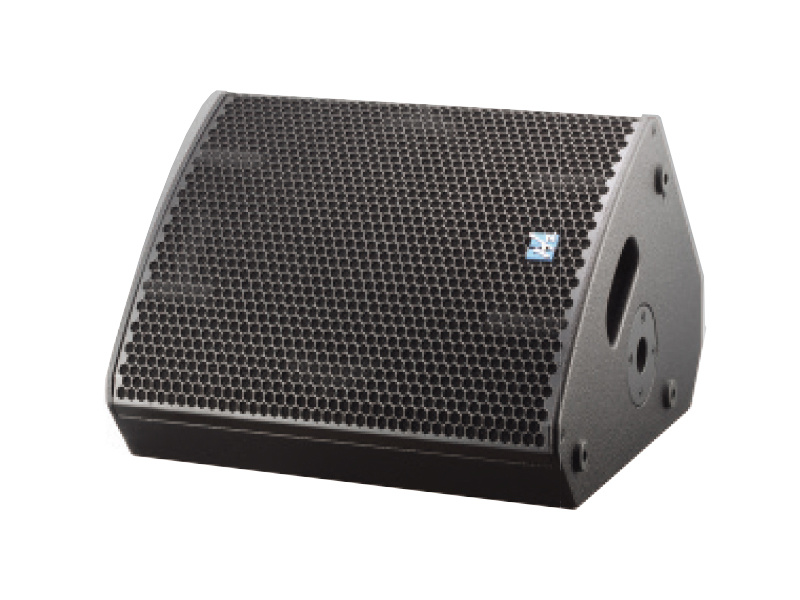
Wedge monitors are the traditional choice for stage monitoring. Their triangular design allows for optimal positioning, projecting sound towards the performer while minimizing spill into the audience.
2. In-Ear Monitors (IEMs)
In-ear monitors have gained popularity due to their ability to deliver high-quality sound directly to the performer’s ears, reducing stage volume and providing greater sound isolation. Understanding how to mix for IEMs is crucial for sound engineers.
3. Side-Fill Monitors
For larger stages, side-fill monitors can provide a broader sound coverage area. These speakers are typically placed on the sides of the stage and should be adjusted based on the overall mix to ensure a cohesive sound.
Common Mistakes in Monitor Placement
1. Ignoring Performer Feedback
Artists often have specific preferences for monitor sound. Ignoring their feedback can lead to unsatisfactory performance experiences. Engage with performers during sound checks to ensure their preferences are met.
2. Poorly Integrated Systems
Using mismatched speakers can lead to phase issues and poor sound quality. Ensure that all components of the monitor system are compatible for optimal performance.
3. Inadequate Sound Checks
Rushing through sound checks can result in missed opportunities to optimize the audio experience. Allow ample time for sound checks to fine-tune monitor placements and levels.
Conclusion
Positioning stage monitor speakers is a nuanced process that requires careful consideration of various factors. By adhering to best practices and understanding the intricacies of audio setups, sound engineers can create an optimal environment for performers. Whether you are setting up for a small gig or a large concert, the right speaker positioning can make all the difference in delivering a memorable audio experience. By taking the time to implement these strategies, you can ensure that every performance is met with clarity and excellence, enhancing the overall enjoyment for both performers and the audience alike.
Frequently Asked Questions
1. What is the ideal height for stage monitor speakers?
The ideal height for stage monitor speakers is at ear level of the performers when they are in their playing position.
2. How do I prevent feedback from stage monitors?
To prevent feedback, position monitors away from microphones, use directional microphones, and adjust the monitor angles.
3. Can I use both wedge monitors and in-ear monitors at the same time?
Yes, many performers use a combination of both to achieve the best sound experience, depending on their preferences and stage dynamics.
4. What are the benefits of using in-ear monitors?
In-ear monitors provide sound isolation, reduce overall stage volume, and allow for more precise sound delivery directly to the performer.
5. How often should I conduct sound checks for monitors?
Sound checks should be conducted before each performance to ensure optimal sound quality and to accommodate any changes in the lineup or equipment. Regular checks help in addressing any issues that may arise.
By following these expert guidelines and best practices, sound engineers can greatly enhance the overall experience of live performances, ensuring that both performers and audiences enjoy crystal-clear sound quality.

CONTACT
Hzaudio Office Address: 16 st joins ave, mont Albert, Vic 3127, Australia
Hzaudio Lab Address: No. 455, Fuyi Road, Dalong Street, Panyu District, Guangzhou, China
Tel: +86 20-34882578 Cell:+86 18620144731
E-mail: sale@hzaudio.com
Follow Us On Wechat!