

Mastering Sound Mixing with Stage Monitor Speakers: Essential Tips and Techniques
Mastering Sound Mixing with Stage Monitor Speakers: Essential Tips and Techniques Table of Contents Introduction to Stage Monitor Speakers Understanding Sound Mixing on Stage The Importance of Stage Monitors in Live Sound Types of Stage Monitor Speakers Setting Up Stage Monitors for Optimal Performance Mixing Techniques for Stage Monitor Speakers Troubleshooting Common
Apr 20,2026
Mastering Sound Mixing with Stage Monitor Speakers: Essential Tips and Techniques
Table of Contents
- Introduction to Stage Monitor Speakers
- Understanding Sound Mixing on Stage
- The Importance of Stage Monitors in Live Sound
- Types of Stage Monitor Speakers
- Setting Up Stage Monitors for Optimal Performance
- Mixing Techniques for Stage Monitor Speakers
- Troubleshooting Common Sound Issues
- Tips for Musicians Using Stage Monitors
- Frequently Asked Questions
- Conclusion
Introduction to Stage Monitor Speakers
Stage monitor speakers are essential tools in live performance environments, providing musicians and performers with the necessary sound reinforcement to hear themselves and their fellow band members clearly. These speakers help create a balanced mix on stage, allowing performers to focus on their playing without the distractions of external noise. In this comprehensive guide, we will explore the best practices for mixing sound with stage monitor speakers, ensuring that both performers and audiences enjoy an exceptional auditory experience.
Understanding Sound Mixing on Stage
Effective sound mixing is crucial for live performances. It involves the blending of various audio elements such as vocals, instruments, and effects to create a cohesive sound. Understanding the basics of sound mixing is key to achieving optimal results with stage monitor speakers.
The Role of the Sound Engineer
A skilled sound engineer plays a vital role in delivering the perfect mix. They are responsible for balancing the audio levels, adjusting equalization settings, and making real-time adjustments during the performance. A good sound engineer understands the unique requirements of each performer and tailors the mix accordingly.
Key Concepts in Sound Mixing
Familiarizing yourself with essential sound mixing concepts will empower you to create an efficient setup. Key concepts include:
- **Level Control:** Adjusting the volume of each audio source for balanced sound.
- **Equalization (EQ):** Modifying frequency ranges to enhance clarity and reduce muddiness.
- **Panning:** Distributing audio signals across the stereo field for a natural sound experience.
- **Effects Processing:** Adding reverb, delay, or other effects to enrich the audio mix.
The Importance of Stage Monitors in Live Sound
Stage monitors not only enhance the musicians' ability to hear themselves but also contribute to the overall quality of the performance. Here are several reasons why stage monitors are indispensable:
Enhancing Performers’ Confidence
When performers can hear themselves clearly, they can deliver more confident and engaging performances. This clarity allows them to focus on their craft without second-guessing their timing or pitch.
Creating a Better Experience for the Audience
A well-mixed sound on stage leads to a more enjoyable experience for the audience. When performers are confident, they are more likely to connect with the audience, resulting in a memorable event.
Types of Stage Monitor Speakers
Understanding the different types of stage monitor speakers can help you choose the right one for your performance needs. Here are the most common types:
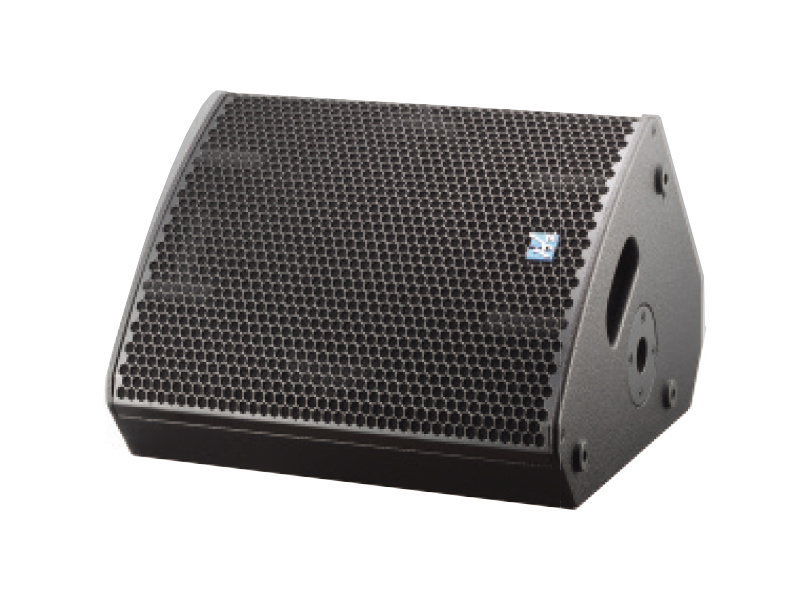
Wedge Monitors
Wedge monitors are the most traditional form of stage monitors. They are angled towards the performers and sit on the floor, providing direct sound reinforcement. These monitors are versatile and widely used in various performance settings.
In-Ear Monitors (IEMs)
In-ear monitors offer a more personal listening experience by delivering sound directly into the performer’s ears. This reduces stage noise and allows for better sound isolation. IEMs are increasingly popular among modern musicians due to their portability and effectiveness.
Side-Fill Monitors
Side-fill monitors are positioned at the sides of the stage and are typically used in larger venues. They provide additional sound reinforcement for performers, ensuring that they can hear the mix clearly, even from a distance.
Setting Up Stage Monitors for Optimal Performance
A well-thought-out setup is crucial for maximizing the effectiveness of stage monitor speakers. Here are key steps to consider:
Placement of Monitor Speakers
Position monitors strategically to provide the best sound coverage. Wedge monitors should be angled towards the performers, typically between 30 to 45 degrees. Ensure that they are not too close to the microphone to avoid feedback issues.
Adjusting Levels and EQ
Start by setting a balanced level for each monitor. Once levels are established, make EQ adjustments to shape the sound. Pay attention to frequency ranges that may cause feedback and cut those frequencies to enhance clarity.
Testing Before the Performance
Always conduct a soundcheck before the actual performance. This allows you to fine-tune the mix and address any potential issues. Encourage performers to provide feedback during the soundcheck to ensure their comfort.
Mixing Techniques for Stage Monitor Speakers
Effective mixing techniques are essential for creating a polished sound. Here are some best practices to follow:
Utilizing Proper Gain Staging
Gain staging is critical in preventing distortion and maintaining audio quality. Ensure that each signal is strong but not clipping. A clean gain structure allows for better control over the mix.
Monitoring Feedback and Adjusting Accordingly
Feedback can be a significant issue when using stage monitors. Monitor the system for potential feedback points and adjust the EQ and placement of microphones and speakers to mitigate this risk.
Using High-Pass Filters
Engaging high-pass filters on vocals and certain instruments can help eliminate low-frequency noise and mud in the mix. This leads to a cleaner and more defined sound, allowing each element to shine.
Troubleshooting Common Sound Issues
Even with careful preparation, sound issues can arise during a performance. Here are common problems and their solutions:
Feedback Problems
Feedback often occurs when the microphone picks up sound from the monitor speakers. To reduce feedback, consider adjusting the monitor's placement, lowering the volume, or employing notch filters.
Uneven Sound Distribution
If performers are experiencing uneven sound distribution, check the levels and positioning of the monitors. Make sure that all audio sources are balanced and that monitors are directed towards the performers.
Insufficient Volume
Inadequate volume can hinder a performance. If a performer cannot hear the mix clearly, investigate the gain levels, ensure the monitors are powered, and check for any potential issues in the signal chain.
Tips for Musicians Using Stage Monitors
For musicians, using stage monitors effectively can enhance their performance. Here are some tips:
Communicate with Your Sound Engineer
Maintain open communication with the sound engineer. Share your preferences regarding monitor mixes, so they can tailor the sound to your liking.
Practice with Your Monitors
Familiarize yourself with the stage monitors during rehearsal. This will help you adjust to the sound and discover what works best for you.
Adjust Your Performance Techniques
Sometimes, performers may need to adjust their performance techniques based on the monitor sound. Be flexible and adapt to ensure the best possible performance.
Frequently Asked Questions
1. What is the best type of monitor for live performances?
The best type of monitor depends on the specific needs of the performance. Wedge monitors are versatile, while in-ear monitors provide better isolation.
2. How do I prevent feedback in my stage monitors?
To prevent feedback, position your monitors away from microphones, lower their volume, and use EQ to cut problematic frequencies.
3. Can I use regular speakers as stage monitors?
While it's possible, regular speakers are not designed for the unique requirements of stage monitoring. It’s best to use dedicated stage monitors for optimal performance.
4. How do I set up my monitors for a band performance?
Position the monitors to face each performer, adjust the levels and EQ for clarity, and conduct a soundcheck to fine-tune the setup.
5. What role does a sound engineer play during a live performance?
The sound engineer balances audio levels, manages EQ settings, and adjusts the mix in real-time to ensure a high-quality sound experience for both performers and the audience.
Conclusion
Mixing sound with stage monitor speakers requires a blend of technical knowledge and practical experience. By understanding the importance of stage monitors, utilizing effective mixing techniques, and troubleshooting common issues, you can create an exceptional sound environment for all performers. With these tips, you can enhance the live performance experience and ensure that both musicians and audiences enjoy a captivating auditory journey. Embrace the art of sound mixing, and you will elevate every performance to new heights.

CONTACT
Hzaudio Office Address: 16 st joins ave, mont Albert, Vic 3127, Australia
Hzaudio Lab Address: No. 455, Fuyi Road, Dalong Street, Panyu District, Guangzhou, China
Tel: +86 20-34882578 Cell:+86 18620144731
E-mail: sale@hzaudio.com
Follow Us On Wechat!